

Sales cycle
From meeting to signature, with no dead time.
Cuevr gets your proposal out while the meeting is still fresh. Your prospect picks their options and signs right on the page, without waiting for a new version.
14 days · 5 proposals · no credit card
Fictional example
10 years in sales, sharpened by our clients’ teams.






A deal slows down at two moments.
A proposal that goes out late, then a client waiting for the right version before committing.
What you see : “After the meeting, the proposal waits until I find the time.”
What it may mean
It goes out late, and the conversation can cool off in the meantime.
What Cuevr shows you
- From a template
- Co-build with Cuevr
What you see : “The client is torn between two packages: here we go for another round of quotes.”
What it may mean
Each variant can cost one more version and one more exchange.
What Cuevr shows you
- Quote options
- What you are signing
What you see : “The client said yes, the signature is waiting for a meeting.”
What it may mean
Print, sign, scan: each step can add a delay.
What Cuevr shows you
- Accept this proposal
What you see : “This deal has stalled, and I didn’t notice.”
What it may mean
It can be stuck at a step without anyone realizing.
What Cuevr shows you
- Inactive
- Signature opened
Less waiting, from proposal to agreement.
The proposal goes out faster, then the client builds their offer and signs without waiting for your next version.
Prepare
A complete proposal in under 15 minutes instead of 2 hours.
Start from a template approved by your team, from a proposal to duplicate, or co-build the outline with Cuevr from the deal’s qualification. In a template, the structure and fixed content are already in place; each variable zone is either written by Cuevr AI for this client or filled with your components. You only rewrite what changes, and the proposal goes out while the meeting is still fresh.
- Four starting points: Blank, From a template, Duplicate a proposal, Co-build with Cuevr
- Variable zones: Have Cuevr write it or Offer components
- An outline drawn from what the client told you
From a template · Co-build with Cuevr · Variable zone · Have Cuevr write it · Offer components
Learn more about proposal templatesCompose
Your prospect builds their offer on the page.
In the proposal’s quote, your prospect ticks or unticks the options you planned, and the quote total follows. You receive the Quote options signal; the reader’s card shows the selected options, every addition, every removal, and the contract value before and after. If they come back later, they find their choices on the same link, always on the latest published version.
- Options selected, added or removed, reader by reader
- The contract value excl. VAT, before and after
- One link, always on the latest published version
Quote options · Selected · Their changes · Added · Removed · Contract value excl. VAT
Learn more about interactive proposals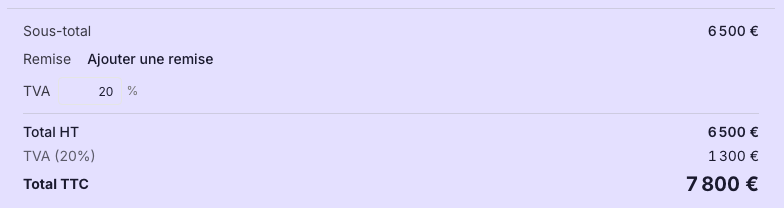
Sign
The yes comes with its options.
When accepting, your prospect reviews What you are signing, with their selected options named, signs by typing or drawing their signature, then confirms their address with a code received by email. The accepted version and its options are locked in the proof file: a simple electronic signature, legally valid (eIDAS Regulation, Article 25).
- The signed options, named on the deal value
- Your own signature tool, if you prefer
What you are signing · Selected options · Type · Draw · No Cuevr e-signature
Learn more about e-signatureUnblock
Stalled deals surface on their own.
An inactive proposal, a signature opened but not finished, a deal with no outcome: each one surfaces in To do today, with the button that leads to its proof.
To do today · Inactive · Signature opened · To close
Learn more about proposal tracking

Prepare the proposal you keep putting off.
Start from a template, plan your options, and let your prospect build their offer and sign it on the page.
The old way of selling, and its dead time.
| Criterion | As usual | What it leaves | With Cuevr |
|---|---|---|---|
| Preparing | You start from the last proposal and clean it up. | Sentences from another client, a proposal that goes out late. | An approved template, zones written for this client, an outline drawn from the qualification. |
| Adjusting the offer | A new version of the quote at every hesitation. | PDFs crossing paths, a client left waiting. | The client ticks their options on the page; you see their choices and the contract value. |
| Signing | Print, sign, scan, send back. | A yes waiting for a meeting. | Acceptance on the page, with its options, the version locked in its proof. |
Your cycle, measured deal by deal.
Cuevr calculates the median time to close of your won deals, from first publication to outcome, and the median length of a won deal, from the proposal’s creation to outcome. In the Team view, the owner and admins see the pipeline by stage and the overdue deals: you know where deals slow down, and with whom.
Median time to close · Median length of a won deal · Team pipeline

Move faster, without rushing the client.
Does Cuevr really shorten our sales cycle?
Yes, on the two stretches that drag it out. Before sending, the proposal starts from a template or an outline drawn from the qualification. After, your prospect adjusts their options and signs on the page, with no new version to wait for. The median time to close, calculated on your won deals, shows you the gain on your own business.
Can the prospect adjust the quote themselves?
Yes, within the frame you set: they tick or untick the options you planned, and the total follows. You receive the Quote options signal and see, reader by reader, the options selected, added or removed, and the contract value before and after. At signature, the selected options are named in What you are signing and locked in the proof.
What happens if we correct the proposal after sending it?
The link doesn’t change. Republishing adds the new version to the same link, and your readers read the latest published version: no file to resend. A signed proposal stays locked as long as the acceptance is active.
Does a hand-drawn signature have legal value?
Your prospect types their name or draws their signature: this mark is stamped on the proposal, but what counts is their proof of acceptance, their identity, their email verified by a code and the timestamp. It is a simple electronic signature, legally valid (eIDAS Regulation, Article 25).
Can we keep our own signature tool?
Yes. Cuevr doesn’t impose its own signature: the proposal then invites your client to write to the sales rep, call them or open the link to your signature process. It is also the way to go if a contract requires a higher level of signature.
Does our CRM keep up with the proposal without re-entry?
Through its API and webhooks: publication, signature, the deal’s outcome, and even a change in quote options can be sent to your CRM, Make or n8n, depending on the events you tick. Your CRM can also create a proposal from a deal.
Other challenges, other industries.
Challenges
Increase your closing rate
Increase your closing rate, deal after deal.
Reduce ghosting
Never leave a proposal without a next step.
Create winning proposals
A proposal that sells, even when you’re not in the room.
Industries
Agencies
Win the pitch with your proposal.
Consulting firms
Defend your fees before you bring them up.
B2B SaaS vendors
Give your contact what it takes to win over their team.
IT services firms
When skills look alike, win on the response.
A proposal ready sooner, an offer signed on the page.
Pick the deal that has been waiting too long: prepare its proposal, plan its options, and let your prospect sign them right where they read it.